 Relistic
Dashboard and CRM
See your sales, fees and profit by store and month, and keep notes on your buyers.
Dashboard
Click Dashboard in the left menu. Choose a period at the top: Last 30 days, This month, Last month, This year or All time.
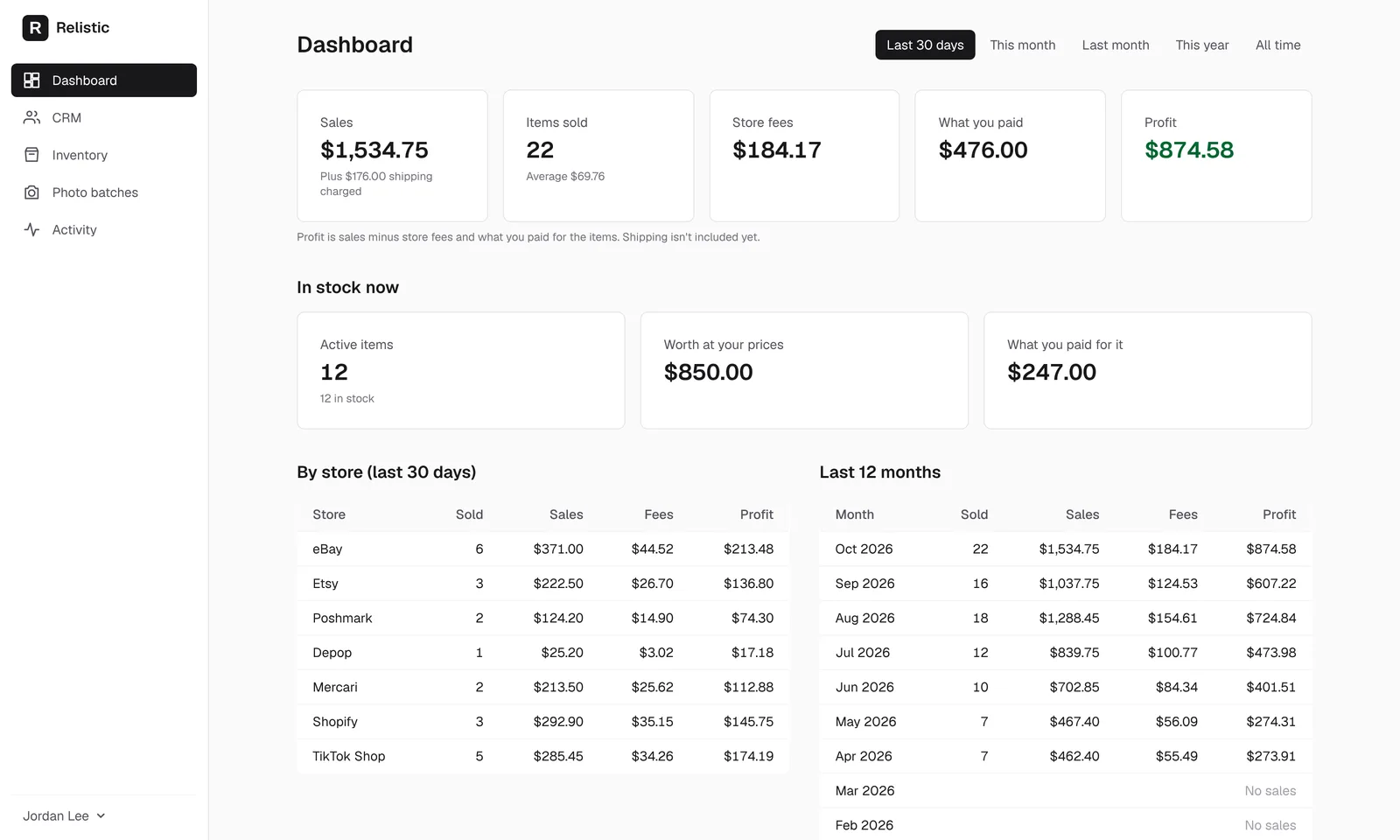
- Sales: what buyers paid for items, with shipping charged shown underneath.
- Items sold and the average sale.
- Store fees: what the stores took.
- What you paid: your cost for the items sold, from the What you paid box on each item.
- Profit: sales minus store fees and what you paid. Shipping isn't included yet.
Below that, In stock now shows how many items are active, what they're worth at your prices and what you paid for them, followed by tables By store and for the Last 12 months.
Profit is only right if you fill in What you paid on your items, or Cost of goods on the Sales page. The dashboard also counts refunds and other costs you enter there.
CRM (your buyers)
Click CRM in the left menu to see everyone who has bought from you on a connected store, what they bought and when. Repeat buyers are marked.
Type a note about a buyer (for example "prefers fast shipping") and click Save note. Only you see your notes.
Buyers show up after your first sale. Some stores, such as Shopify and TikTok Shop, don't share buyer details with apps, so those sales appear without a buyer.
Still stuck? Email angela.b@apeirosmarketing.com and we'll help.